

84% of organizations in SAPinsider's 2025 migration research rated minimizing operational disruption as important or very important. That's the right priority, and it's also where most SAP database migration plans go quiet. A plan can prove that tables copied successfully and still leave finance unable to close, warehouses unable to trust stock, or sales teams staring at open orders that don't match reality.
I treat the database move as a business trust problem, not a copy job. The question isn't only whether the load finished. It's whether inventory, balances, tax records, reports and interfaces produce the same decisions after cutover as they did before it. Build your plan around that test and the technical work gets clearer, faster.
Table of Contents
- Why SAP Database Migrations Are Moving Up the Agenda
- Which SAP Database Migration Method Fits Your System
- Assessing Scope, Data Owners and Schedule Risk
- How to Run the Migration Step by Step
- Validating Data Before You Go Live
- Downtime Windows and Rollback Plans That Hold
- Governance and the Decisions to Take This Week
Why SAP Database Migrations Are Moving Up the Agenda
In valantic's 2025 survey of 201 companies, 40% of surveyed companies had SAP S/4HANA migration projects underway in 2025, up from 21% in 2024. The database move is no longer a side task inside a bigger programme. It's on the critical path.
An SAP database migration moves the persistence layer of the system, often to SAP HANA. It rarely travels alone. Release upgrades, conversions, custom code remediation, interface changes and report rebuilds usually move with it, so structures and the logic that reads them change at the same time.
Where the two day plan breaks
Say a manufacturing team plans a two day move based on database size and export time. During profiling, the team finds month end reports reading directly from custom Z tables that nobody currently employed documented. A planning interface also pulls from a view that won't exist in the target. The copy was never the hard part. The undocumented dependencies were.
A database size tells you how long the copy takes. It tells you almost nothing about how long trust takes.
By the end of your assessment, you should be able to classify your project cleanly. Is it a pure database move, a combined upgrade and move, or a new build with selective data transfer? Those three shapes have different downtime, testing and ownership needs. Don't set dates until you've picked one.
Which SAP Database Migration Method Fits Your System
Start with fit, not tooling. The five approaches below cover most estates, and each one fails in a predictable way.
SAP database migration methods compared
| Method | Typical fit | Downtime exposure | Main risk |
|---|---|---|---|
| Homogeneous database migration | Same database vendor, new hardware or version | Medium, set by data volume | Performance changes after the move |
| Heterogeneous database migration | Move to a different database system such as SAP HANA | High, full data copy and conversion | Data type and encoding mismatches |
| DMO with SUM | Upgrade to S/4HANA combined with a database move | Medium to high, tied to the upgrade window | Long outage if custom code is not ready |
| Brownfield conversion | Keep existing data and processes while converting | Medium, runs inside the cutover window | Legacy custom code and inconsistent data carry over |
| Greenfield implementation | New configuration with selective data transfer | Lower for history, higher for process redesign | Process gaps and missing historical data |
How to choose in practice
If the release stays the same and only the database changes, you're in homogeneous or heterogeneous territory. A homogeneous move is mostly a platform exercise. A heterogeneous move to HANA adds data type conversion, code page and encoding checks, and performance retesting for SQL that behaved differently on the old engine.
If the system must also move to a new release, a separate database move usually wastes an outage. DMO with SUM, the Database Migration Option of Software Update Manager, combines the upgrade and the database change into one run. Brownfield conversion goes further and converts the existing system in place, data and processes included. Both protect continuity. Both also carry your old problems forward unless you clean them first.
Greenfield is the right answer when process redesign is the goal. You build new configuration and move selected master data and open items, often through SAP Migration Cockpit. You leave years of clutter behind, but you take on process gaps and hard questions about historical reporting.
Five minute rule: Count your custom objects and the years of history that must stay live in the new system. Those two numbers drive effort more than the choice of database does.
High custom object counts plus deep history point toward conversion or DMO, with serious remediation time. Low history needs plus broken processes point toward greenfield. Our SAP migration methodology sets out how that choice connects to sequencing and governance, and it's worth testing your draft choice against it before you commit.
The table shows typical fit, not your downtime. Real downtime depends on volume, hardware and restart behaviour. You don't know it until you've measured it in a proof of concept.
Assessing Scope, Data Owners and Schedule Risk
You're not alone if assessment feels late. Process Excellence Network reported that in 2025, 59% of companies were fully or partially live on SAP S/4HANA, an increase of 13 percentage points from 2024. Programmes are moving, and weak scoping is getting exposed faster.
The planning view below is where I'd start, with inventory, ownership and schedule on one board.

Build the inventory before design
Classify every table and object by six things:
- Volume: Row counts and growth rate, because they size the window.
- Business criticality: What stops if this object is wrong on day one.
- Dependency depth: Which interfaces, jobs and reports read it directly.
- Customisation level: Z tables, custom fields and modified standard objects.
- Retention requirement: What must stay live, what can be archived, what can go.
- Transformation complexity: Straight copy, mapping change, or full redesign.
Then estimate five efforts separately: extraction, cleansing, loading, reconciliation and business validation. Teams estimate the first three carefully and guess at the last two. That's backwards. Reconciliation and validation are where rehearsals stall.
Name owners, then run the proof of concept
Every object needs a business data steward, not only a technical owner. A basis lead can confirm a load ran. Only finance can confirm the trial balance is believable. Record who signs off each object, in writing, before the first load. A structured SAP data governance framework helps here because it ties stewardship to domains rather than to whoever happens to be in the room.
Schedule risk isn't pessimism, it's arithmetic. The ISG SAP migration report reports that nearly 60% of migrations were behind schedule and over budget, mainly because complexity was underestimated, scope expanded and internal capacity ran short.
Run an early proof of concept on your largest tables and your most customised process. Measure throughput and restart behaviour. Does a failed load resume cleanly or start again from zero? Use those numbers to size infrastructure and the window.
Three checks you can run this week:
- Custom object count: List custom objects per module, with owners.
- Interface inventory: List every interface and report reading the source database directly.
- Freeze window: Confirm with the business when changes stop, and who enforces it.
Then make a blunt decision. If the proof of concept can't meet the window with headroom, don't start design. Shrink the scope or get a longer window. Hoping for a faster final run is not a plan.
How to Run the Migration Step by Step
Run the migration as a repeatable cycle, not a single heroic cutover. The flow below compresses the work into five stages.

In practice, I'd break that flow into ten steps. Each step has a reason, and each one has a slip that breaks it.
- Define scope and data owners in writing. Every object gets one accountable person. The slip is a shared mailbox as owner, which means nobody decides when a defect needs a judgement call.
- Profile source tables and dependencies. Check volumes, null rates, orphan records and direct database reads. Hidden links discovered here are cheap. Discovered during cutover, they're an outage extension.
- Extract in the agreed order. Master data first, then open transactional items, then history. Loading transactions before the master data they reference guarantees rejection queues you'll clear by hand.
- Transform into target structures and version the rules. Keep mapping logic for fields, units, currencies and status codes in version control. If a rule lives in a spreadsheet on someone's laptop, it doesn't exist.
- Cleanse before the first real load. Remove duplicate, incomplete and obsolete master data now. Cleansing late means every rehearsal runs on bad data and proves nothing.
- Load representative subsets into a sandbox. Test business rules and referential integrity on a slice that includes your messiest records, not your cleanest. Sanitised samples flatter the design.
- Run at least three full rehearsals at production like volumes. Include delta capture, interface quiescence and timed restarts. Turn every defect into a repeatable transformation or validation rule, so rehearsal two doesn't rediscover rehearsal one's problems.
- Reconcile counts, balances and control totals. Compare source and target per object and chase every unexplained difference to a named cause. Skipping this to save time just moves the argument to go live weekend.
- Execute the production cutover inside the agreed window. Freeze interfaces, capture deltas, and run the rehearsed sequence without improvisation. Leaving an interface running during the load is the classic self inflicted wound.
- Monitor through hypercare. Watch batch chains, interface queues, rejected postings and the reports the business opens first each morning. Agree the hypercare length before cutover, not during the first incident call.
The mechanics here overlap with good data centre practice, and the Beyond Surplus guide to secure migrations is a useful companion read on handling the physical and security side of moving infrastructure while systems are in flux.
This walkthrough shows the execution rhythm in practice, including where teams pause for checks rather than pushing on.
You'll know a rehearsal is ready when two things are true. There are zero unexplained reconciliation differences, and the timed run fits the window with spare capacity for one restart. Anything less means you're rehearsing hope.
Validating Data Before You Go Live
Technical reconciliation proves the copy is complete. It doesn't prove the business still works. Inventory availability, open orders, financial balances, tax relevant records and month end reports can all be technically present and operationally wrong.
That gap is widely felt. In a 2024 UK and Ireland survey reported by TechTarget, 75% of respondents identified data management as the top challenge in SAP S/4HANA migration.
The checklist below frames validation as business checks, not just counts.
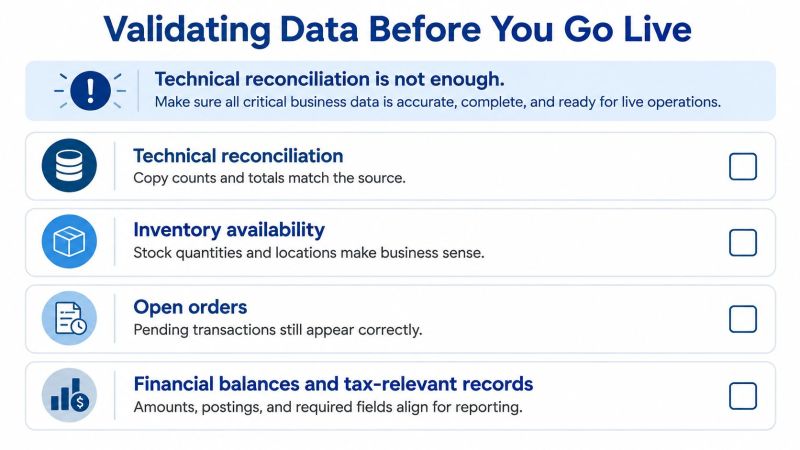
Set gates the business signs before rehearsal
Reconciliation gates for each migrated area
| Check | What to compare | Tolerance to agree | Sign-off owner |
|---|---|---|---|
| Record counts | Source versus target counts per object | Zero unexplained difference | Data steward |
| Financial control totals | Balances and open items per ledger | Zero difference | Finance lead |
| Open orders and inventory | Quantities and status before and after | Zero for critical items, agreed threshold otherwise | Supply chain lead |
| Duplicate and mandatory fields | Duplicate rate and blank required fields | Threshold set per object | Master data owner |
| Key reports and interfaces | Output of monthly reports and outbound feeds | Matches within agreed tolerance | Integration lead |
Set tolerances by consequence. Financial totals get zero difference, because a small unexplained gap in a ledger isn't small to an auditor. Less critical objects can carry an agreed threshold, but the business owner signs that threshold before the first rehearsal. Tolerances negotiated during cutover aren't tolerances. They're pressure.
Keep validation continuous. Run the same checks at every rehearsal and again after cutover, using the same definitions each time. That's what makes a passing rehearsal mean something. Our SAP data validation approach builds those checks into the load cycle so defects surface as rules, not surprises.
You can test your readiness today. Pick three reports the business relies on monthly, run them on the source and on a sandbox copy, and compare outputs line by line. If nobody can explain a difference, you've found your first gate failure while it's still free to fix.
Downtime Windows and Rollback Plans That Hold
Your downtime window comes from rehearsal timings, not from the date the business would prefer. Take your slowest timed rehearsal, not your best. Add buffer for a restart, a slow interface drain and one decision that takes longer than expected. Then check the total still fits after the freeze period, because a window that only works if nothing goes wrong isn't a window.
If it doesn't fit, you have honest options. Reduce history in the live load and archive the rest. Pre load stable master data ahead of the window. Split the cutover by company code or plant. What you can't do is compress validation and call it efficiency.
Rollback is a designed path
A rollback plan that fits in one sentence will fail when you need it. You need three elements, all tested.
- Verified backup: Taken immediately before cutover, with a restore performed in a test environment. An untested backup is a belief, not a recovery option.
- Defined rollback point: The moment after which reversing is no longer practical, for example once target postings begin or downstream systems consume new data. Write it down with a clock time.
- Named decision owner with pre agreed criteria: One person who can call rollback, using triggers set in advance such as a failed financial control total or an interface that can't be reconciled.
Say a team reaches the rollback point with a reconciliation difference in one ledger and ninety minutes of window left. Without criteria, that becomes a two hour debate among tired people. With criteria signed weeks earlier, the finance lead confirms the trigger is met and the decision owner calls rollback in minutes. Nobody enjoys it. Everybody understands it.
Rollback criteria agreed in a calm meeting protect you from decisions made at 3 a.m. by exhausted people.
There's a real trade off. A longer rollback window lowers risk but raises cost, because you maintain the source, delay downstream changes and staff two paths. Agree that trade off with the business before the final rehearsal, while it's still a commercial conversation.
At the go or no go meeting, I want four confirmations on the record. The backup restored successfully in test. The rollback point written down. The decision owner named and present. The interface freeze confirmed by the people who run the interfaces. If any answer is vague, that's a no go wearing a costume.
Governance and the Decisions to Take This Week
Governance fails when it becomes status reporting. It works when it forces decisions in the right order. Take these three this week.
First, confirm your migration method against your scope inventory and named owners. If the method assumes clean master data and your inventory shows duplicate rates nobody owns, the method isn't confirmed yet. Second, lock gate tolerances with each business owner, signed, before the first rehearsal. Third, book the next rehearsal only after those two are done. A rehearsal without owners and tolerances produces activity, not evidence.
What holds after go live
Keep one data steward per domain, covering master data, finance and supply chain at minimum. Keep the reconciliation reports running through hypercare, on the same definitions you used in rehearsal, so drift shows up as a number rather than a complaint. Log every production data defect with its root cause, and feed the fix back into your transformation rules and rehearsal checks. That loop is how the second wave gets cheaper than the first.
Set a steering cadence of every two weeks during hypercare. Keep a standing agenda: open defects, gate results, tolerance breaches. Short, specific, decision focused. As old hardware and platforms retire during the programme, factor in sustainable ITAD in your technology roadmap so decommissioned kit is handled securely and responsibly rather than left as an afterthought in a storeroom.
Outside help makes sense in three cases. Your team has little experience with SAP data migration tooling such as Migration Cockpit or SAP Data Services. Custom code and legacy tables are poorly documented. Or your schedule has no room for a failed rehearsal. In those cases, an external assessment covering source systems, migration priorities, workload design and governance can test the plan before you commit to it.
Weigh that cost against a missed cutover window, which usually costs more in extended downtime, rebooked freezes and lost business confidence. An in house team with time and documentation can absolutely do this well. Outside help is one option, not a default.
Take five items to your next steering meeting: method confirmed, owners named per object, tolerances signed, rehearsal dates booked, hypercare period agreed. If you can say yes to all five, your SAP database migration is being run as a business programme. If you can't, you know exactly where the risk lives.
If you're planning an SAP database migration and want the business trust checks built in from day one, we can help with assessment, migration planning, execution and validation, using accelerators such as Pulse for SAP data migration to keep only complete and accurate data moving into your target. Share your migration requirements with us and we'll test your scope, owners and rehearsal plan before you commit to dates. Start the conversation at Kagool.

