

Your team needs data from SAP ECC, S/4HANA, BW/4HANA, or HANA in a cloud analytics platform. The business wants fresh reporting, the security team wants governed extraction, and the integration team wants to avoid another custom pipeline that only one specialist understands. Meanwhile, latency, SAP compatibility, target architecture, and operational effort all pull the decision in different directions.
The right answer usually starts with the integration pattern, not the vendor name. This list compares native SAP platforms, CDC and replication products, managed ELT, Azure-native pipelines, middleware, and a SAP-focused accelerator by the problem they solve. For each option, look at source coverage, extraction and replication approach, target environments, governance, implementation effort, and the limitation most likely to affect your architecture.
That discipline matters in mixed estates. SAP's integration portfolio has evolved through major platform acquisitions, including Business Objects in 2007 and Sybase in 2010, while the wider field moved from early heterogeneous database interoperability toward enterprise-scale integration systems. The result is a capable but often fragmented set of tools, which makes architecture and governance as important as connectivity. Teams handling sensitive workforce information should also align the design with a broader GDPR-ready HR data migration approach.
Table of Contents
- 1. Velocity for SAP data ingestion made easy
- 2. SAP Data Intelligence Cloud
- 3. SAP Integration Suite for application and process flows
- 4. SAP HANA Smart Data Integration
- 5. SAP Landscape Transformation Replication Server
- 6. Qlik Replicate for SAP
- 7. Informatica Intelligent Data Management Cloud with SAP connectors
- 8. Fivetran for SAP
- 9. Azure Data Factory and Synapse Pipelines SAP connectors
- 10. Precisely Connect including Connect CDC
- Top 10 SAP Data Integration Tools Comparison
- Turn the shortlist into an integration decision
1. Velocity for SAP data ingestion made easy
Velocity by Kagool is designed for the common enterprise problem of moving SAP data into cloud analytics without building every extraction and control layer from scratch. It's an SAP-certified, no-code ingestion accelerator for SAP ECC, S/4HANA, and BW/4HANA, with support for tables, ODP and BW extractors, CDS views, and HANA calculation views.
The important distinction is that Velocity focuses on repeatable SAP-to-cloud ingestion, rather than trying to become a universal application middleware platform. Its built-in change data capture supports continuous movement where the source object and architecture are suitable, while prebuilt connections support Azure, Databricks, Microsoft Fabric, AWS, and Snowflake. That gives data teams a practical route from SAP objects to modern lakehouse, warehouse, and analytics environments.

Where Velocity fits best
Velocity is strongest when the source estate is predominantly SAP and the target estate is already cloud-oriented. A no-code design reduces the amount of bespoke extraction code engineers need to maintain, while governance, observability, and compliance-aligned extraction practices help address the operational concerns that appear after the first successful load.
It's also relevant as SAP extraction rules tighten. SAP Insider reports that SAP Note 3255746 restricts ODP-RFC to transfers between SAP applications. The restriction concerns the ODP Data Replication API over RFC in SAP-to-non-SAP scenarios, not RFC as a protocol generally, so extraction design needs to distinguish the affected pattern from other valid connectivity options. SAP's ODP-RFC guidance is essential reading before approving a migration path.
Practical rule: Validate the extraction method against the specific SAP object, deployment model, and target. A connector that works in a development system may still be unsuitable for a governed production workload.
Pros
- SAP-focused coverage: Supports core SAP artifacts including tables, ODP and BW extractors, CDS views, and HANA calculation views.
- Cloud target choice: Connects with Azure, Databricks, Microsoft Fabric, AWS, and Snowflake.
- Lower engineering burden: No-code pipeline provisioning and repeatable delivery patterns reduce custom build effort.
- Operational support: Kagool's delivery model includes governance practices, observability, scalability, and 24/7 support.
Cons
- SAP-centered scope: Bespoke non-SAP extraction or unsupported objects may need another platform or custom engineering.
- Vendor engagement: The accelerator model requires licensing and delivery coordination for an enterprise rollout.
2. SAP Data Intelligence Cloud
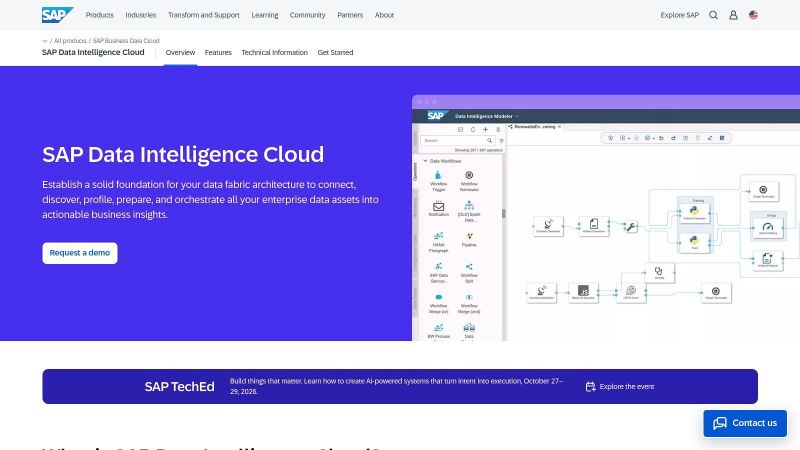
SAP Data Intelligence Cloud is the broadest first-party option in this list for teams that need data discovery, orchestration, pipeline execution, and governance across SAP and non-SAP systems. It runs on SAP BTP and provides a visual environment for designing data flows, scheduling jobs, connecting sources, and applying operational controls.
It's a sensible choice when metadata and lineage are not optional extras. SAP systems often contain several representations of the same business process, such as application tables, extractors, views, and downstream models. Data Intelligence Cloud can help teams catalogue those assets and connect pipeline activity to a broader governance model instead of treating ingestion as an isolated engineering task.
Operational trade-offs
The platform is a strong fit for hybrid and multi-cloud estates that want SAP alignment without limiting every destination to SAP technology. Its SAP connectivity includes ECC, S/4HANA, BW, BW/4HANA, and HANA, while its broader integration capabilities support non-SAP targets and pipeline operators.
The trade-off is operational. Teams must understand SAP BTP service plans, runtime configuration, identity, networking, and platform administration. That isn't a problem for an SAP BTP-centered organization, but it can slow adoption when the data engineering team primarily works in another cloud or already operates a separate orchestration standard.
Pros
- First-party SAP alignment: SAP-maintained connectivity can reduce version and compatibility concerns.
- Governance depth: Cataloging, lineage, and policy controls support auditability.
- Hybrid orchestration: Useful for coordinating SAP and non-SAP pipelines in one environment.
Cons
- BTP dependency: Runtime operations and commercial planning are tied to SAP BTP constructs.
- Learning curve: Non-SAP teams may need time to adopt SAP-specific administration and development patterns.
See the product capabilities in SAP Data Intelligence Cloud before choosing it as the enterprise standard.
3. SAP Integration Suite for application and process flows
SAP Integration Suite solves a different problem from a dedicated ingestion accelerator or CDC engine. It's SAP's iPaaS for application, API, process, and B2B integration, with Cloud Integration, API Management, Open Connectors, eventing, and partner-facing capabilities.
Use it when SAP needs to exchange messages or invoke services across business applications. Common patterns include SAP-to-CRM updates, supplier and customer integrations, API-led access, B2B and EDI exchanges, and process orchestration. It can also move data, but high-volume analytical ingestion needs careful design because message processing, payload handling, and edition selection aren't the same as bulk replication.
SAPinsider's 2025 BTP research identifies Integration Suite as the most used SAP BTP service, with usage rising from 63% in 2024 to 80% in the 2025 findings, a 17-point increase in one year. The same research reports that organizations integrate an average of 37 applications, and 85% rank integration as the most important SAP BTP capability. These findings are reported in the SAPinsider BTP data and integration research.
Where it works, and where it doesn't
Integration Suite is particularly effective when the integration estate needs reusable APIs, maintained SAP content, and consistent policies across application flows. Its prebuilt integration content can reduce development effort, especially when the required business scenario maps closely to an existing package.
It's less attractive as the only platform for large analytical data movement if the design depends on frequent bulk transfers. The commercial model and edition choices need to be mapped to actual message volumes and patterns. A clear SAP integration architecture helps prevent teams from forcing application middleware to perform the role of a data replication platform.
Pros
- Application semantics: SAP content and adapters support common enterprise integration scenarios.
- API and B2B breadth: API Management, Open Connectors, eventing, and B2B capabilities extend beyond simple file or table movement.
- Platform consolidation: One SAP BTP service can cover several integration patterns.
Cons
- Volume economics: Message-based pricing and edition selection can become complicated for high-throughput data movement.
- Design discipline: Teams need to separate application integration from analytical ingestion instead of treating every flow as the same workload.
4. SAP HANA Smart Data Integration
SAP HANA Smart Data Integration, or SDI, is the natural choice when HANA is the center of gravity. It supports data federation, batch movement, replication, transformations, and connectivity to a range of source systems. Rather than forcing every dataset into a separate warehouse, SDI lets architects decide whether data should remain virtual, be physically loaded, or use a combination of both.
That flexibility matters in HANA and SAP Datasphere architectures. Frequently queried or performance-sensitive data can be materialized, while less frequently used information can remain federated where the source and latency profile allow it. HANA security and engine integration also reduce friction for organizations that already govern their analytics estate inside the SAP data platform.

Federation versus physical replication
SDI works best when the architecture team has made an explicit decision about latency, source-system impact, query performance, and storage. Federation can reduce duplication, but it leaves analytics dependent on source availability and query behavior. Physicalization improves isolation and performance, but introduces load schedules, reconciliation, storage, and refresh management.
Smart Data Quality adds profiling and cleansing capabilities, which can help teams identify inconsistent values before they reach analytical models. Still, SDI isn't the most turnkey option for landing SAP data across a broad set of non-SAP lake and warehouse targets. That distinction is covered in this SAP data extraction guide for enterprise leaders.
Pros
- HANA-native execution: Minimal friction in HANA-centric and SAP Datasphere designs.
- Pattern flexibility: Supports federation, replication, batch movement, and transformations.
- Data quality support: Profiling and cleansing can sit close to the integration layer.
Cons
- Primary-store bias: The strongest fit assumes HANA remains the main analytical platform.
- Broader cloud estates: Non-SAP lake and warehouse destinations may require additional tooling.
Review the current capabilities in SAP HANA Smart Data Integration against the target architecture, not just the source connector list.
5. SAP Landscape Transformation Replication Server
SAP Landscape Transformation Replication Server, commonly called SLT, addresses row-level replication from SAP operational systems. It uses trigger-based change capture and logging to replicate data from systems such as ECC and S/4HANA into HANA and other downstream environments.
SLT is a foundational choice when the requirement is near-real-time movement of operational records rather than broad orchestration across APIs and business processes. Its central cockpit supports initial loads and ongoing replication monitoring, giving SAP teams a familiar first-party operating model.
Source impact must be designed
The main limitation is also the defining implementation constraint. SLT uses source-system triggers, so the SAP application team needs to understand the effect on database activity, custom tables, maintenance windows, and upgrade procedures. Source impact, replication scope, table relationships, and target loading behavior need to be tested with production-like data.
SLT can be highly effective for a controlled SAP-to-HANA replication architecture. It's less convenient when the organization wants a managed, cross-cloud ingestion service with minimal SAP-side configuration or when the target pattern changes frequently.
Replication is not a substitute for data modeling. SLT can move rows reliably, but the target still needs business keys, reconciliation rules, history handling, and ownership.
Pros
- Near-real-time row movement: Suitable for operational replication scenarios.
- SAP alignment: A first-party approach can simplify support discussions around SAP systems.
- Monitoring cockpit: Initial loads and ongoing replication are visible in one operational interface.
Cons
- Source changes: Triggers and source-side configuration require careful governance.
- Sizing: High-volume replication needs capacity planning and workload controls.
- Limited orchestration scope: SLT doesn't replace API management, application integration, or broad data cataloging.
The SAP documentation for SLT should be checked alongside the exact source and target releases before implementation.
6. Qlik Replicate for SAP
Qlik Replicate is a strong option when the central requirement is high-performance CDC into cloud warehouses and lakes. It provides SAP-specific endpoints and supports replication patterns for core SAP applications, HANA, and BW-related scenarios. The platform is built around reducing the operational burden of moving changes continuously rather than designing every load as a custom batch job.
Its broad target coverage makes it useful in heterogeneous estates. A team can use SAP as a source while landing data in platforms such as Snowflake, Databricks, BigQuery, or Azure environments. That flexibility is valuable when the enterprise has already standardized analytics on a non-SAP platform.
What to validate before selecting it
The CDC design still depends on the extraction method available for the source object. Teams should confirm whether the required SAP data is supported through the intended endpoint, how initial loads are coordinated with ongoing changes, and how deletes, updates, schema changes, and retries are represented at the destination.
Qlik's SAP-focused documentation and support matrix can reduce implementation ambiguity, but large or complex deployments may require vendor involvement. Pricing is quote-based, so the business case should include source coverage, environments, replication tasks, support, and expected growth rather than treating the license as a simple connector purchase.
Pros
- Mature CDC: Designed for continuous, performance-oriented replication.
- Target breadth: Supports major cloud warehouse and lake destinations.
- SAP guidance: SAP-specific setup material can help teams avoid unsupported extraction patterns.
Cons
- Premium economics: Pricing may be difficult to estimate without a properly scoped workload.
- Implementation support: Complex estates may need vendor or specialist assistance.
- Replication focus: It's not a complete replacement for cataloging, MDM, or application integration.
Explore Qlik Replicate for SAP when low-latency replication is more important than no-code end-to-end orchestration.
7. Informatica Intelligent Data Management Cloud with SAP connectors
Informatica Intelligent Data Management Cloud, or IDMC, fits organizations that want SAP integration inside a larger enterprise data management program. Its SAP connectivity includes ODP Extractor, BAPI, and IDoc patterns, while the wider platform adds cloud data integration, cataloging, data quality, governance, and MDM.
That breadth changes the buying decision. IDMC may be excessive for a narrow SAP-to-warehouse feed, but it can be a logical standard when the same governance team already manages data quality rules, business glossaries, master data, and lineage across multiple domains.

The value is in the surrounding controls
IDMC's hybrid patterns support batch and near-real-time movement across diverse targets. Its catalog and quality capabilities help teams connect technical pipelines with data ownership and stewardship, which is important when SAP data feeds finance, supply chain, HR, or regulated reporting.
The downside is implementation weight. Enterprise licensing and planning can be substantial, particularly when the organization is introducing several platform modules at once. Teams should also separate genuine governance requirements from platform features that won't be adopted by data owners.
Pros
- Broad management scope: Integration, cataloging, quality, governance, and MDM work together.
- SAP interface coverage: ODP, BAPI, and IDoc connectivity supports varied SAP patterns.
- Enterprise fit: Suitable for organizations standardizing data management across many domains.
Cons
- Complex commercial model: Licensing normally requires detailed vendor engagement.
- Longer planning cycle: Large SAP estates need architecture, ownership, and rollout planning.
- Potential overbuy: A simple ingestion workload may not justify the full platform.
The Informatica IDMC platform is best assessed through a complete operating model, including stewardship and support, not only pipeline construction. Teams researching MDM use cases can also review this perspective on Informatica MDM for eCommerce data teams.
8. Fivetran for SAP
Fivetran is aimed at teams that want managed ELT with minimal pipeline operations. Its SAP approach uses OData and ODP patterns for initial and incremental loads, then delivers data into cloud warehouse and lake environments with managed scheduling, monitoring, and deployment.
That makes it attractive for analytics teams that prefer to load data first and transform it inside the destination. The platform can reduce the amount of infrastructure an engineering team operates, especially when the target environment already has established modeling practices and the SAP source objects fit the available connector scope.
The connector boundary matters
Fivetran's simplicity depends on what SAP exposes through supported OData and ODP extractors. Standard objects may be straightforward, while custom entities or unusual extraction requirements can require extra configuration or another tool. Incremental behavior also needs validation. A connector that supports delta tracking for one object doesn't automatically make every custom object incremental.
Hybrid deployment options help reach on-premise SAP systems securely, but network routing, SAP authorizations, extractor configuration, and destination permissions still belong in the implementation plan. Managed operations reduce platform administration, not source-system responsibility.
Pros
- Low operational overhead: Scheduling, monitoring, and connector maintenance are managed.
- Analytics orientation: Well suited to cloud warehouse and lake ingestion.
- ELT fit: Teams can keep transformations close to the analytical destination.
Cons
- Extractor dependence: ODP and OData availability limits incremental coverage.
- Thin pre-load transformation: Complex SAP business rules may need downstream modeling or another tool.
- Usage sensitivity: Workload design should account for the platform's active-row pricing model.
Review Fivetran's SAP connectivity against the exact OData services, ODP extractors, and custom entities in scope.
9. Azure Data Factory and Synapse Pipelines SAP connectors
Azure Data Factory and Synapse Pipelines are the practical default for a Microsoft-centered estate that needs to land SAP data in ADLS, Synapse, or Microsoft Fabric. Microsoft provides connectors for SAP ECC, S/4HANA, BW, BW/4HANA, HANA, and SAP CDC through ODP, while the pipeline services provide scheduling, orchestration, monitoring, and Azure-native security integration.
This option works particularly well when the target architecture is already defined in Azure. Data can move into storage and then into Azure compute or analytics services without introducing a separate integration control plane. Teams can also coordinate SAP loads with other Azure sources in the same orchestration environment.

Azure-native does not mean SAP-simple
SAP connectivity still requires careful configuration. Advanced scenarios may need a self-hosted integration runtime, particularly where SAP remains on premises or network boundaries are strict. ODP-based incremental and CDC flows also need source-side setup, authorizations, and testing.
The strength of ADF and Synapse is orchestration and destination integration, not automatically solving every SAP extraction problem. Teams should define whether the pipeline consumes tables, extractors, ODP, SLT, or another supported route, then document the operational owner for each component. Kagool's SAP-to-Azure integration services can be relevant where the architecture needs SAP and Azure delivery expertise together.
Pros
- Microsoft alignment: Direct path into ADLS, Synapse, and Fabric.
- Orchestration breadth: SAP loads can run beside other Azure data pipelines.
- Hybrid support: Self-hosted runtime options address on-premise connectivity constraints.
Cons
- Infrastructure responsibility: Teams still manage network, runtime, identity, and SAP configuration.
- ODP complexity: Incremental and CDC patterns need deliberate setup.
- Azure bias: Multi-cloud destinations may require additional architecture.
Start with Microsoft's SAP connector documentation, then validate the selected connector against the actual SAP releases and security model. If the program is also building its cloud capability, this Azure Data Engineer hiring guide provides useful context for role planning.
10. Precisely Connect including Connect CDC
Precisely Connect and Connect CDC target organizations that need always-on, scalable replication across hybrid estates. The platform uses log and CDC-based patterns to limit unnecessary source activity and supports distributed deployments through dedicated agents. Its broad source and target coverage makes it relevant where SAP is one part of a larger regulated or operational data ecosystem.
The main appeal is predictability. A replication platform built for continuous workloads can support architectures where downstream systems need timely changes without repeatedly scanning SAP tables. It can also provide a consistent operating model across cloud and on-premise destinations.
Fit for regulated hybrid environments
Precisely Connect is more likely to fit a mature integration team than a small analytics group seeking a quick managed connector. Deployment topology, agent placement, security, replication scope, retention, restart behavior, and target reconciliation all require design decisions.
Licensing is quote-based, so the total cost of ownership should include infrastructure, support, operations, skills, and the number and criticality of replication flows. The platform's strength is sustained replication, not necessarily the fastest route to a first analytical dataset.
Pros
- Low-latency replication: Log and CDC patterns support continuous movement.
- Distributed operation: Agents can serve hybrid deployment requirements.
- Enterprise controls: Operational tooling and support can suit regulated environments.
Cons
- Commercial scoping: Pricing requires vendor engagement.
- Architecture effort: Hybrid topology and source coverage need detailed planning.
- Not a complete governance platform: Additional catalog, quality, and stewardship capabilities may be necessary.
Assess Precisely Connect and Connect CDC against the replication SLAs, SAP extraction constraints, and operational controls your team can support.
Top 10 SAP Data Integration Tools Comparison
| Solution | Core features | Quality (★) | Price / Value (💰) | Target (👥) | Unique selling point (✨/🏆) |
|---|---|---|---|---|---|
| Velocity: SAP data ingestion made easy! | No‑code SAP CDC, broad SAP artifact support, native cloud connectors | ★★★★★ | 💰 Licenseed accelerator; lowers TCO via faster delivery | 👥 Large enterprises modernizing SAP → cloud | ✨ SAP‑certified no‑code CDC + repeatable pipelines; 🏆 backed by Kagool delivery & governance |
| SAP Data Intelligence Cloud | Cloud‑native orchestration, metadata, lineage, governance | ★★★★☆ | 💰 SAP BTP pricing (service plans) | 👥 SAP‑centric analytics & governance teams | ✨ First‑party lineage & catalog tightly integrated into SAP BTP |
| SAP Integration Suite | iPaaS: cloud integration, API Mgmt, Open Connectors, B2B | ★★★★ | 💰 Edition/message‑based pricing; suited for app integration | 👥 Integration architects & SAP app teams | ✨ Large catalog of prebuilt packs + API/B2B capabilities |
| SAP HANA Smart Data Integration (SDI) | Adapters, replication/federation, Smart Data Quality | ★★★★ | 💰 HANA‑centric licensing or add‑on | 👥 HANA/Datasphere architects and analytics teams | ✨ Mix of virtual federation + physical ETL for HANA‑first builds |
| SAP Landscape Transformation Replication (SLT) | Trigger‑based row‑level replication, monitoring cockpit | ★★★★ | 💰 SAP supported; low‑latency option (SAP licensing) | 👥 Real‑time ops teams & SAP DBAs | ✨ Proven trigger/replication for operational SAP scenarios |
| Qlik Replicate for SAP | Log/CDC replication, SAP endpoints, multi‑target support | ★★★★☆ | 💰 Quote‑based; premium at scale | 👥 Enterprises needing high‑throughput CDC | ✨ Mature, performance‑oriented CDC with SAP implementation guides |
| Informatica IDMC (with SAP connectors) | SAP connectors + catalog, DQ, MDM, ELT orchestration | ★★★★★ | 💰 Enterprise pricing; broad platform value | 👥 Enterprise data management & MDM teams | ✨ End‑to‑end data management (catalog, DQ, MDM) for SAP estates |
| Fivetran for SAP | Managed ELT, OData/ODP incremental, fully managed pipelines | ★★★★ | 💰 Consumption (MAR) model; low ops overhead | 👥 Analytics teams wanting managed ingestion | ✨ Fast time‑to‑value and simple consumption pricing |
| Azure Data Factory / Synapse Pipelines | SAP connectors (ODP/CDC), orchestration to ADLS/Synapse/Fabric | ★★★★☆ | 💰 Azure consumption billing; native landing to Azure | 👥 SAP‑to‑Azure modernization teams | ✨ Native Azure/Fabric integration and Microsoft support matrix |
| Precisely Connect (incl. Connect CDC) | Log/CDC replication, high throughput, distributed agents | ★★★★ | 💰 Quote‑based enterprise licensing | 👥 Regulated industries & always‑on replication needs | ✨ Designed for scalable, low‑latency replication in regulated estates |
Turn the shortlist into an integration decision
The shortlist should become a decision only after the team maps tools to workloads. Start by defining the freshness requirement for each data product, then separate scheduled batch, incremental loading, near-real-time replication, API exchange, and event-driven application flows. Don't ask one platform to solve all of them by default.
Next, inventory the SAP objects. Record whether each dataset comes from a table, ODP or BW extractor, CDS view, HANA calculation view, BAPI, IDoc, SLT replication, or another interface. Confirm the available delta mechanism, source authorizations, expected change behavior, deletes, customizations, and restrictions created by the current SAP deployment model. SAP Insider's guidance on the ODP-RFC restriction is particularly important because the affected pattern is SAP-to-non-SAP use of the ODP Data Replication API over RFC, not RFC as a protocol generally.
Then confirm the destination strategy. Velocity, Qlik Replicate, Fivetran, and Precisely Connect make sense when the core requirement is SAP data movement into cloud analytics or hybrid targets. Azure Data Factory and Synapse Pipelines are strongest when Azure storage and analytics already define the landing zone. SAP Data Intelligence Cloud, Integration Suite, SDI, and SLT are compelling when SAP governance, HANA, BTP, application semantics, or first-party operational support are central.
Governance needs its own evaluation. The SAP Global State of Integration Survey reports that half of companies use three or four integration tools, creating compatibility and business-value problems. SAPinsider's research also indicates that only just over one-fifth of organizations currently use SAP integration toolsets, while 30% are evaluating them or recognize the need. Those findings point to an operating-model gap, not just a missing connector. Consolidation should therefore include ownership, lineage, alerting, secrets management, deployment controls, support escalation, and retirement criteria for legacy flows.
A practical selection sequence looks like this:
- Define latency and volume: Classify each flow by freshness, load shape, restart requirements, and source-system tolerance.
- Map SAP extraction paths: Validate tables, ODP, BW, CDS, HANA views, SLT, BAPI, and IDoc availability for every priority object.
- Confirm target platforms: Identify whether data lands in HANA, Datasphere, Azure, Fabric, Databricks, Snowflake, AWS, or several destinations.
- Assess governance: Require lineage, reconciliation, access control, audit evidence, monitoring, and clear ownership.
- Validate infrastructure: Check network routes, self-hosted runtimes, SAP agents, BTP services, identity, and operational coverage.
- Model total effort: Include licensing, implementation, SAP changes, testing, support, skills, and legacy-tool retirement.
Choose native SAP options when SAP semantics, HANA alignment, and first-party governance dominate. Choose CDC and replication products when low-latency row movement and continuous operation are the priority. Choose managed ELT when reducing day-to-day pipeline operations matters more than deep pre-load transformation. Choose Azure services for Microsoft-centered estates. Choose Velocity when a repeatable SAP-to-cloud ingestion approach, supported delivery model, and compliance-aligned extraction design are priorities.
Before production, run a representative pilot. Include a high-volume object, a delta-enabled object, a custom or difficult object, and a destination that reflects the analytics architecture. Reconcile source and target counts and business totals, test restart and failure recovery, verify duplicate and delete handling, confirm security and least-privilege access, document ownership, and agree who provides production support. A tool is ready only when the team can operate it after the implementation partner leaves.
Kagool helps enterprises design and deliver SAP data integration across ECC, S/4HANA, Azure, Databricks, Microsoft Fabric, and other modern analytics platforms, including its Velocity no-code SAP ingestion accelerator. Visit Kagool to discuss your SAP extraction constraints, tool-sprawl risks, target architecture, and path to a supportable production rollout.

