

You can tell when an SAP CDS view has outgrown the tutorial stage. The syntax is fine, the first dashboard works, and then the business starts asking for another join, another text field, another Fiori filter, and another report variant. That is usually when performance, governance, and lifecycle hygiene stop being background topics and become the main job.
A SAP CDS view is not just a prettier SELECT statement. In productive SAP systems, it becomes the semantic layer that decides what gets reused, what gets exposed, and what the database can still optimize when volume and complexity increase.
Table of Contents
- What an SAP CDS View Actually Is
- How CDS Views Evolved Across SAP Releases
- Defining a CDS View with DEFINE VIEW ENTITY
- The Three Layers of CDS Modeling
- Associations, Cardinality, and Parameters
- Annotations and Access Control in Practice
- Performance Rules That Hold Up in Production
- The 2026 Performance Pitfalls Most Guides Skip
- Lifecycle Hygiene, Drafts, and Safe Migration
- How CDS Views Fit with OData, AMDP, and BW
- Quick Reference for Daily CDS Development
- Frequently Asked Questions on SAP CDS Views
What an SAP CDS View Actually Is
A Core Data Services view is a database-centric model defined in ABAP with CDS DDL, then activated so SAP can register the resulting database object for pushdown and consumption. SAP's own guidance frames CDS as a way to better use the computational power of SAP HANA, with later additions such as annotations, parameters, expressions, functions, association join types, and access control extending the model over time. The practical point is simple, the view is meant to sit close to the data and let the database do the heavy lifting, not the ABAP layer. SAP's ABAP CDS introduction
Classic ABAP Dictionary views never gave teams that full semantic surface. CDS adds associations instead of rigid foreign-key thinking, annotations for UI and OData consumption, and DCL for access control. That combination lets one artefact serve analytical queries, Fiori elements, APIs, embedded analytics, BW extraction, and enterprise search without duplicating the model in several places.
What changes in practice
The main shift is architectural. A CDS view should be treated as a projection layer over one or more database tables or views, not as an application-tier transformation engine. SAP's ABAP glossary confirms that modern CDS view entities are defined with DEFINE VIEW ENTITY and read through ABAP SQL or other CDS entities, which is why the pushdown story matters so much in real systems. ABAP CDS glossary
Practical rule: keep the model reusable and semantic, expose only what consumers need, and push heavier logic into a higher consumption layer rather than into the interface layer.
That rule sounds obvious until a team starts folding business rules, text derivations, and report-specific filters into the same artifact. At that point, the CDS view stops being a shared enterprise abstraction and becomes another fragile custom report.
How CDS Views Evolved Across SAP Releases
CDS developed in stages, and each stage changed what teams could reasonably build and support. The SAP community timeline places the first CDS objects for HANA in 2012, ABAP CDS availability in 2014, and CDS at the center of S/4HANA's Virtual Data Model in 2015. ABAP CDS views arrived with NetWeaver 7.40 SP05. Later, view entities replaced the older DDIC-based approach for new development, with classic DDIC-based CDS views becoming obsolete from ABAP 7.57, aligned with S/4HANA 2022. SAP CDS release timeline CDS view entities versus DDIC-based CDS views
The release history matters in project work. A pattern that compiles in one system may fail in another because the ABAP stack lacks the required syntax, annotations, association behavior, or runtime support. Check the target release before copying a design from a newer S/4HANA system into ECC, an older S/4HANA installation, or a hybrid environment.
CDS feature availability across releases
| Release | Core Feature Added | Practical Impact |
|---|---|---|
| 2012 | First CDS objects for HANA | Established the semantic repository concept on the HANA side |
| 2014 | ABAP CDS becomes available | Brought CDS into the ABAP stack with code pushdown |
| 2015 | CDS becomes central to S/4HANA VDM | Made CDS the foundation for reporting, Fiori, APIs, analytics, BW extraction, and enterprise search |
| 2020 | CDS view entities arrive | Simplified the model by focusing on one modern view type |
| 2022 | Classic DDIC-based CDS becomes obsolete | Pushed new development toward view entities |
| 2025 to 2026 | Repair, migration, and performance-related additions | Shifted attention from syntax to lifecycle and runtime issues |
The recent SAP help material reflects a more mature operating model. Its focus includes migration from legacy Custom CDS Views, deletion of unfinished drafts, and repair of inconsistent views. Those concerns rarely appear in introductory syntax guides, yet they determine whether a model remains supportable after upgrades and transport failures.
The practical lesson is direct: release compatibility is only the starting check. Production CDS work also requires ownership, repair procedures, and performance testing. A view that is correct on paper can still become a CPU hotspot when newer runtime behavior, such as LOCALE handling or FDA hints, changes its cost at scale.
Defining a CDS View with DEFINE VIEW ENTITY
A modern CDS artefact starts as a DDL source in ABAP Development Tools, usually in a naming pattern such as Z_I_… for interface views. The DEFINE VIEW ENTITY form is the current modeling style for new development, and it maps cleanly to the ABAP runtime and HANA pushdown model. SAP's glossary also makes clear that CDS annotations can influence runtime behavior and consumption semantics without changing the SQL projection itself. ABAP CDS glossary
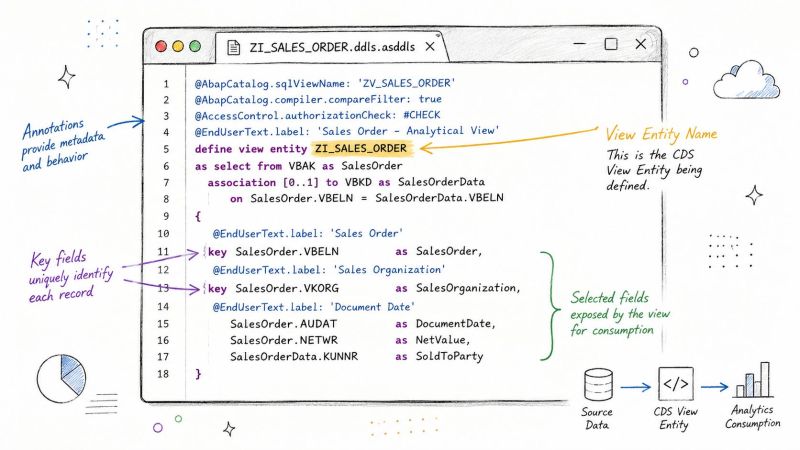
A simple sales-order example usually shows the pattern best. The header view reads from VBAK, the item data from VBAP, and the projection exposes only the fields the consumer needs. A rename is often clearer than letting technical table names leak into the UI, and a single calculated field can stay readable if it is kept modest.
define view entity Z_I_SalesOrder
  as select from vbak as Header
    inner join vbap as Item
      on Item.vbeln = Header.vbeln
{
  key Header.vbeln           as SalesOrder,
      Header.erdat            as CreatedOn,
      Header.kunnr            as SoldToParty,
      Item.posnr              as SalesOrderItem,
      Item.matnr              as Material,
      Item.kwmeng             as OrderQuantity,
      Item.netwr              as NetValue,

      currency_conversion(
        amount             => Item.netwr,
        source_currency    => Header.waerk,
        target_currency    => 'USD',
        exchange_rate_date => Header.erdat
      )                       as NetValueUSD
}
Activation is where the artefact becomes real. At that point, transport handling, naming checks, and ATC findings can surface mistakes that syntax alone will miss. The resulting object is then addressable from ABAP SQL and other CDS consumers, which is why a thin, valid definition is more valuable than a clever one that fails in activation or performs badly in production.
The Three Layers of CDS Modeling
SAP's standard layering approach still holds up because it keeps responsibility separated. A base view reads the raw business table or table cluster, an interface view adds stable semantics and reusable keys, and a consumption view shapes the final experience for UI, OData, or analytics. That hierarchy is not decorative, it is what keeps one consumer from breaking another.
Why one mega-view fails in real systems
A direct projection from base table to final app view usually looks elegant in a demo and painful in production. Cardinality blows up when a text or item relation is joined too early, client handling becomes harder to reason about, and annotations start leaking into places they were never meant to live. Once that happens, reuse goes down because no team wants to inherit a model full of scenario-specific assumptions.
Here is a practical example with MARA, MAKT, and a custom product extension. The base view exposes raw product data, the interface view adds semantic fields like material description and unit context, and the consumption view adds UI annotations and search behavior. That separation also makes extensibility less risky because the technical foundation stays stable while the top layer can change with the app.
If a view is going to be reused by BW, Fiori, and a service API, the interface layer should stay boring on purpose.
That does not mean every design needs three deep stacks for trivial lookups. A tiny read-only helper that feeds one report can stay shallow. But once a model becomes a shared enterprise asset, layering is the difference between controlled reuse and annotation sprawl. Kagool's database design guide for founders is useful here as a general reminder that clean data boundaries pay off only when they stay simple enough for teams to maintain.

Associations, Cardinality, and Parameters
Associations are where CDS starts to feel different from classic ABAP joins. A good association says, “these records are related,” and lets the database resolve the join only when the consumer follows the path. That makes the model lighter and more reusable, but only if cardinality is honest.
Cardinality is not a guess
Overstating [1..1] when the source can be empty or multiple-valued is one of the easiest ways to get misleading results. If the relationship is optional, use [0..1] or [0..*] as appropriate. If it is single-valued, TO ONE or [n..1] gives the optimizer room to skip work until the fields are requested.
| Cardinality | Join Behavior | Row Impact | Use Case |
|---|---|---|---|
[0..1] |
Optional single record | Safe for nullable relationships | Header to optional text or master data |
[1..1] |
Mandatory single record | Can be wrong if data is missing | Only when the relationship is guaranteed |
[0..*] |
Optional multiple records | Can multiply rows | Header to items |
[1..*] |
Mandatory multiple records | Always expands rows | Document to dependent records |
Parameters also deserve discipline. WITH PARAMETERS is useful for client, language, and date inputs when the consumer really needs them, but a parameter is a bad substitute for a static filter. If a filter is constant, keep it in the view logic so the database can push it down efficiently. In the SAP performance guidance, early filtering and proper cardinality are treated as core design rules, not optional tuning tricks. SAP CDS performance rules
define view entity Z_I_SalesOrderParam
  with parameters
    p_language : abap.lang
as select from vbak as H
  association [0..*] to vbap as _Item
    on _Item.vbeln = H.vbeln
{
  key H.vbeln as SalesOrder,
      H.erdat  as CreatedOn,
      _Item
}
where H.spras = $parameters.p_language
Annotations and Access Control in Practice
Annotations are not just metadata labels. They change how consumers interpret the view, which fields they surface, and whether the model behaves like a report source, a service source, or an analytical object. The most common mistakes are either under-annotating a consumption view or assuming annotations on a base view will magically serve every layer above it.
The annotations developers actually use
| Category | Annotation | Effect |
|---|---|---|
| UI | @UI.lineItem |
Marks fields for list report display |
| UI | @UI.selectionField |
Makes fields available in filters |
| UI | @UI.hidden |
Suppresses a field from the generated UI |
| OData | @OData.publish: true |
Exposes the view as an OData service |
| Search | @Search.searchable |
Enables search behavior |
| Search | @Search.defaultSearchElement |
Sets the default search field |
| Analytics | @Analytics.dataCategory |
Tells analytical consumers how to treat the data |
| VDM | @VDM.viewType |
Declares the view's layer role |
Access control is separate and needs to be treated that way. A DEFINE ROLE ... GRANT SELECT ON ... DCL source turns authorization into a working artifact instead of a security assumption. Just as important, DCL on a base view does not automatically solve the consumption problem above it, so each layer needs its own security design or explicit inheritance strategy.
The practical rule is to keep the annotation block close to the layer that consumes it, not sprinkled everywhere. If a view is meant for a Fiori list report, annotate for Fiori there. If it is meant for analytics, optimize that layer rather than overloading the base model with every possible metadata hint.
Performance Rules That Hold Up in Production
Production performance comes from keeping work close to the database, not from adding clever CDS syntax. Filter early, join only what the consumer needs, project narrow field lists, and remove layers that add no business value. These rules matter on ECC to S/4HANA programs, where legacy data, hybrid consumers, and uneven calling patterns often expose weaknesses that small test datasets hide.
Five rules that survive code review
| Rule | Avoid | Prefer | Plan Operator Affected |
|---|---|---|---|
| Push filters down | Filtering after heavy joins | WHERE on the base view |
Scan and join volume |
| Keep hot paths explicit | Excess path-expression hopping | Explicit join logic where it is faster | Join planning |
| Project only needed fields | SELECT * style projection |
Minimal field lists | Transfer and projection cost |
| Avoid unnecessary unions | UNION ALL for simple branch logic |
A single SELECT with OR when it is simpler |
Union and merge cost |
| Keep layering lean | Deep nesting for trivial lookups | Fewer layers for simple reads | Activation and runtime complexity |
A simple MARA and MARC example shows the difference. The weak pattern reads wide data, delays the plant restriction, and carries unnecessary columns through the join. The following definition applies the filter at the source and returns only the fields required by the consuming scenario.
define view entity Z_I_MaterialPlant
  as select from mara as M
    inner join marc as P
      on P.matnr = M.matnr
{
  key M.matnr as Material,
      P.werks as Plant,
      M.mtart as MaterialType
}
where P.werks = '1000'
That design also makes tracing easier. If response time degrades, the operator plan points to a smaller set of joins and projections. In production, test the generated SQL with realistic volumes and inspect the plan rather than assuming that a tidy CDS definition will execute efficiently.
CDS design remains database design. The SAP on Azure performance tuning guide offers a practical companion for reviewing pushdown, data movement, and cloud integration choices. For a practical companion perspective on database design, the database design guide for founders is worth reading alongside plan reviews. Kagool also uses CDS in data movement scenarios, so model choices can affect downstream ingestion as well as SAP response time.
The 2026 Performance Pitfalls Most Guides Skip
The problem with many CDS guides is that they stop at elegant design and never show the ugly cases. In 2026, SAP called out two particularly nasty pitfalls, LOCALE handling that can block HEX engine usage unless a system parameter is enabled, and large IN filter lists that can push CPU high enough to justify FOR ALL ENTRIES with an FDA hint instead. Those are not academic edge cases, they are the sort of issues that show up when a view looks fine in a small test and then falls over under production volume. SAP developer news note on 2026 CDS performance
The failure modes that actually surface
A hidden locale conversion can look like a simple text join in the code and a CONVERT_LOCALE style hotspot in the trace. The root cause is usually implicit handling rather than bad business logic. The minimal fix is often an explicit cast or a cleaner client and locale strategy, not a bigger join.
Large IN lists are another trap. They make parameterized views feel flexible, but they can also bypass the execution path you thought you had, especially when the consuming ABAP code builds the filter dynamically. In that situation, the cleanest correction is often to split the view or change the caller pattern instead of bolting more conditions into the CDS object.

Practical rule: if the ABAP caller is building a huge filter or forcing locale-heavy joins, the CDS view is not the only thing you need to inspect.
Another common mistake is assuming that @Consumption.filter alone will save a Fiori app from shipping unfiltered data. It won't if the view shape itself encourages broad result sets, or if the consuming logic ignores the intended pushdown path. The same goes for FDA hints, because they only help if the overall runtime path still behaves like a database-first query.
Lifecycle Hygiene, Drafts, and Safe Migration
A CDS model is not finished when activation succeeds. Production ownership still requires cleanup, repairability, dependency checks, and a controlled response when the underlying business object changes. Draft handling, migration from legacy Custom CDS Views, and repair of inconsistent objects all belong in the operating process, not as afterthoughts.
What a release checklist should cover
Handle drafts deliberately. Unfinished view drafts left in a production package obscure ownership and create transport noise. Migration from classic DDIC views or older custom CDS patterns also needs staged refactoring, because a direct copy can preserve obsolete dependencies and hide differences in semantics.
Review customizations that overlap with delivered extension points. If a custom CDS object replaces older BAdI-era logic, map its consumers before retiring the source. Reports, OData services, extractors, and dependent views may need to keep compiling while the old object is marked obsolete.
- Draft cleanup: remove unfinished drafts before a transport window closes.
- Migration control: move classic DDIC views or table functions through a staged sequence.
- Dependency checks: identify every report, service, extractor, and view that still uses the old object.
- Transport discipline: select the transport method that matches the delivery model and approval path.
Repair work also needs an owner and a rollback path. Record why a view changed, which consumers were tested, and whether the replacement preserves keys, annotations, authorization behavior, and extraction semantics.
For teams running hybrid SAP estates, governance must connect CDS cleanup with the wider program. Kagool's SAP S/4HANA migration services overview illustrates how this work can sit within a broader migration plan, particularly where ECC customizations meet S/4HANA extension points.
How CDS Views Fit with OData, AMDP, and BW
CDS is not the answer to every data problem, and production teams know that after the first few hard lessons. It is the natural fit when the output is a reusable semantic read model for Fiori, OData, reporting, or analytics. It is the wrong tool when the business rule is procedural, stateful, or better expressed in SQLScript or ABAP logic.
Choosing the right path
| Use case | CDS view | OData service | AMDP | BW extraction |
|---|---|---|---|---|
| Fiori list and object pages | Strong fit | Strong fit | Weak fit | Usually not first choice |
| External API read model | Strong fit | Strong fit | Weak fit | Not typical |
| Procedural HANA logic | Limited fit | Not a fit | Strong fit | Not typical |
| Complex analytics staging | Strong fit | Optional | Sometimes | Strong fit |
| Hybrid S/4HANA plus BW landscape | Strong fit | Optional | Sometimes | Strong fit |
CDS is often the cleanest way to feed OData and RAP-style service models, especially when the source data already lives in S/4HANA. For teams that need service exposure without rebuilding the semantics elsewhere, that keeps the model consistent. If the problem is procedural or window-heavy, AMDP is often the better choice because forcing those patterns into CDS can make the model harder to maintain than the code it replaced.
BW still has a place when the destination is clearly a warehouse domain, not an operational app. The important question is whether the team wants the CDS view to remain the canonical semantic layer or just a feeder into another persistence layer. Kagool's SAP OData service guidance is a sensible companion if your delivery team is deciding how much should stay in CDS and how much should move into an API contract.
Quick Reference for Daily CDS Development
A few patterns come up again and again in review sessions, so it helps to keep them in one mental checklist.

- Minimal skeleton:
define view entity Z_I_Name as select from ... { key ... } - Association syntax:
association [0..1] to ... as _Text on ... - Parameter syntax:
with parameters p_language : abap.lang - Key definition: mark stable business keys explicitly, don't assume the consumer will infer them
- Useful annotations:
@ObjectModel,@Semantics,@OData, and the UI annotations that match the consumer - DCL habit: keep role definitions close to the consumption boundary, not buried in the base model
- Production rule: avoid
SELECT *, prefer left outer associations when the relationship is optional, push filters into the base view, and inspect the HANA plan through traces when response time looks wrong
The most useful shortcut is not syntactic, it is architectural. If a view can be read clearly by someone who did not write it, it is far more likely to survive upgrades, transport conflicts, and the next round of consumer requests.
Frequently Asked Questions on SAP CDS Views
Teams usually ask when a custom CDS view should be retired, and the answer is simple, when its dependents have moved and the view is no longer part of a live contract. Ownership is another common question, and in practice the best split is functional ownership for semantics and technical ownership for performance, transport, and lifecycle control.
Upgrade impact depends on how tightly the view is tied to released SAP artifacts. Key-user extensibility can replace some developer-built views, but not when the consumer needs a stable enterprise semantic layer or stronger performance control. Classic report migration also takes longer than most roadmaps assume, because the CDS model and the RAP or service layer both need time to settle.
Licensing questions are usually really platform questions. What matters in 2026 is whether the runtime and HANA support the model you want to keep, not whether CDS itself is conceptually available. If you need to decide between old reports, new CDS models, and service exposure, start with the consuming contract first, then choose the CDS shape that can stay supportable after the next upgrade.
If your SAP team is trying to clean up CDS sprawl, redesign a slow view, or move from ECC-era reporting into a supportable S/4HANA model, Kagool can help with architecture review, migration planning, and delivery support across SAP and analytics platforms. Visit Kagool to discuss CDS lifecycle hygiene, performance tuning, and migration work that fits your environment.

