

TCP 1433 is the default port for the SQL Server Database Engine, and UDP 1434 is used by SQL Server Browser for named instance discovery. That's the primary answer, but it's only the starting point for how SQL Server behaves in real networks.
The popular advice to “just change the port” misses the operational model. SQL Server runs as a set of services with different roles, different protocols, and sometimes dynamic ports, so the actual task is to understand what each service listens on, who needs access, and what your firewall should allow. Microsoft's documentation treats TCP 1433 as the standard port for the default instance over TCP, while related services use other ports such as UDP 1434 and TCP 2383, which is why port management is a connectivity and control exercise, not a one-line tweak. Microsoft firewall guidance for SQL Server access
Table of Contents
- What the MS SQL Default Port Means
- SQL Server Ports by Service and Role
- Default Instance Versus Named Instance Behavior
- How to Verify and Change the SQL Server Listening Port
- Why Changing the Default Port Is Not Real Security
- Firewall Rules That Cover SQL Server
- SQL Server Ports in Hybrid and Cloud Scenarios
- Troubleshooting Connection Failures Related to Ports
- Quick Reference and Related SQL Server Networking Topics
What the MS SQL Default Port Means
The MS SQL default port for the default Database Engine instance is TCP 1433. That is the number most DBAs, auditors, and network engineers mean when they say “the SQL Server port,” and Microsoft documents it as the standard TCP port for a default instance. Microsoft firewall guidance for SQL Server access
The default answer is correct, but incomplete
A SQL Server host rarely exposes only one service. The engine may listen on 1433, SQL Server Browser may answer discovery requests on UDP 1434, and Analysis Services can use its own port, with Microsoft also documenting TCP 2383 for the default instance of Analysis Services. That broader pattern matters because a firewall rule that only allows 1433 can still miss related traffic.
Practical rule: if someone asks for “the SQL port,” answer with TCP 1433 for the default Database Engine, then immediately ask whether the instance is named, whether Browser is enabled, and which other SQL features are in play.
Think in services, not in slogans
A clean way to explain SQL networking is to separate what listens, what discovers, and what routes. The Database Engine listens for client connections. Browser helps clients find the right endpoint when the instance name alone is not enough. Other services, including high availability and reporting components, may use separate ports and should be documented separately instead of being lumped into the default-port conversation.
That is why changing only 1433 is a weak security move. The first question is which service you are protecting, whether the instance is default or named, and how the firewall, authentication, and client routing rules fit together. If those controls are not in place, a new port number changes very little.
SQL Server Ports by Service and Role
The useful way to talk about SQL Server ports is by service and exposure, not by repeating a single default number. A database engine port, a discovery port, and replica traffic do different jobs, so the firewall and access rules should reflect that split. Microsoft's guidance and normal operating practice both point to the same conclusion, SQL Server is a set of related listeners and paths, not one endpoint that can be handled the same way everywhere. Microsoft firewall guidance for SQL Server access
Common SQL Server Ports by Service
| Service | Default Port | Protocol | Typical Exposure |
|---|---|---|---|
| Database Engine, default instance | 1433 | TCP | Application tiers, admin jump hosts, replication peers when required |
| SQL Server Browser | 1434 | UDP | Internal discovery, usually limited to clients that need named-instance resolution |
| Analysis Services, default instance | 2383 | TCP | BI tools, admin networks, internal analytics paths |
| Reporting Services | Configured per deployment | TCP | Web and reporting consumers, usually fronted by HTTP or HTTPS patterns |
| Integration Services | Configured per deployment | TCP | Administrative and orchestration paths, usually restricted |
| Database Mirroring | Configured per deployment | TCP | Replica-to-replica only |
| Always On Availability Groups | Configured per deployment | TCP | Replica-to-replica, listener-related paths as designed |
The table makes the exposure pattern easier to see. 1433 is the client-facing baseline for the Database Engine, while Browser on UDP 1434 is a discovery service that should stay narrow. Replica traffic for mirroring or Always On belongs in east-west rules between SQL hosts, not in broad client access rules.
Some services use fixed defaults, some are assigned during deployment, and some are tied to a specific topology. That is the part auditors usually care about, because the firewall design should match the service map instead of a vague “open SQL Server” request. If the environment includes named instances or high availability, document the instance name, the listening port, and the allowed source networks together so later changes do not reopen unknown paths.
Community references have long treated 1433 as the default instance port, which is why it still appears in runbooks and ticket queues. That history is useful, because it explains why 1433 remains the common shorthand while the rest of the SQL Server footprint needs its own documented rules. Historical SQL Server port reference
Default Instance Versus Named Instance Behavior
A default instance and a named instance do not behave the same way on the wire, and that difference matters more than the label on the server. The default instance commonly listens on TCP 1433. Named instances often use dynamic ports and may rely on UDP 1434 through SQL Server Browser so clients can discover where the instance is listening. Default port for SQL Server discussion
Why this matters in client connections
Client behavior changes depending on how the connection string is written. If the client specifies only a server name and instance name, Browser can return the current port. If the client specifies a port directly, Browser is not part of that path. That difference shows up fast in firewall rules, monitoring, and failover runbooks, because discovery traffic and direct TCP access are separate control points.
A named instance with a dynamic port can work well, but only if the team treats the port as runtime state, not as a fixed assumption. I have seen connection failures that looked random until someone noticed the instance had moved off the port baked into the application config. That usually means one of two things. Either the client was pointing to an old port, or SQL Server Browser was disabled and the app depended on instance discovery without saying so.
Dynamic ports are convenient, but they change the job
Dynamic ports reduce manual coordination on the server side, but they push the burden into firewall rules, connection strings, and discovery behavior. A named instance that changes ports can be perfectly valid operationally, but the team still has to document the instance name, the current endpoint, and the allowed source networks. If the instance is pinned to a fixed port, troubleshooting is simpler, but the firewall and client settings still have to match the service configuration.
Browser is also a common failure point in locked-down environments. If SQL Server Browser is disabled, blocked by policy, or unreachable across a network segment, clients that depend on instance discovery will not resolve the port even though the database engine is healthy. In that case, the cleanest fix is usually to connect with an explicit port or to make the network and service configuration consistent, not to guess at the instance path.
The main mistake is assuming every SQL instance uses 1433. The default instance commonly does, named instances often do not, and discovery may depend on Browser. That is the mental model to keep on shared database hosts where one server can expose several services with different connection paths. Default port for SQL Server discussion
How to Verify and Change the SQL Server Listening Port
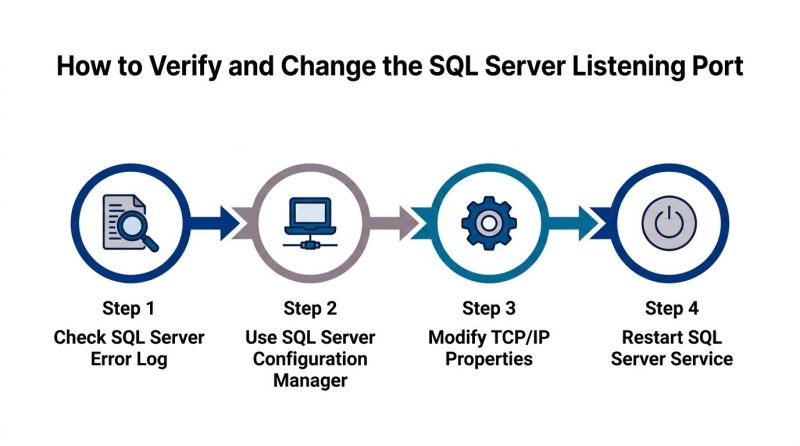
Start by checking the SQL Server error log, because it usually records the listening port when the service starts. That gives you the actual runtime behavior instead of relying on what someone documented months ago in a build sheet. From there, use SQL Server Configuration Manager to inspect the TCP/IP settings and confirm whether the instance is fixed to 1433 or assigned something else.

A safe change sequence
- Check the error log. Confirm the currently listening port before you touch the configuration.
- Open Configuration Manager. Use the SQL Server tool, not a generic network utility, because it reflects the service configuration.
- Edit TCP/IP properties. Set the port only if your change request calls for a fixed endpoint.
- Restart the SQL Server service. Port changes don't matter until the service restarts and binds to the new value.
After the server-side change, update the client side. That can mean connection strings, SQL aliases, load balancer rules, monitoring checks, or any automation that assumes the old endpoint. If you skip that step, the database can be perfectly healthy and still look “down” to application teams.
Here's a useful video walkthrough of the process.
Validate before you hand it back
Validation should include the server, the firewall, and at least one client path. If the SQL Server error log says the instance is listening on the expected port but the app still fails, the problem is probably outside the engine. If the server doesn't show the port you expected, the configuration change didn't take or the service wasn't restarted cleanly.
The same process helps when you're pinning a named instance to a fixed port instead of using dynamic ports. In either case, the rule is the same, verify the actual listener, then verify the path that clients use to reach it.
Why Changing the Default Port Is Not Real Security
Moving SQL Server away from TCP 1433 is often treated as hardening, but on its own it is mostly obscurity. The SQL Server support guidance on 1433 makes the point plain, SQL environments depend on more than one listening path, so hiding a single port does not close the larger exposure if the related paths remain open. Microsoft SQL Server support blog on 1433
What reduces risk
A stronger posture starts with least-privilege network access. Only the application subnets, admin jump hosts, and replica peers that need access should be able to reach the service. Firewalls need to define inbound and outbound paths explicitly, and features that are not in use should stay disabled instead of being hidden behind a nonstandard port. The broader rule is simple, security depends on what can reach the server, not on whether 1433 is visible. Microsoft SQL Server support blog on 1433
Practical rule: if a change only renames the door but leaves the hallway open, you haven't hardened anything.
A disciplined firewall design starts with the network boundary, not the port number. For teams mapping SQL traffic in cloud or hybrid environments, Kagool's cloud infrastructure security best practices guide is a useful reference point for keeping access narrow and documented.
Don't ignore the neighboring services
A team that focuses only on 1433 can still miss Browser on UDP 1434, Analysis Services on TCP 2383, or other feature-specific endpoints such as Always On or mirroring. That is where many environment reviews go wrong. The audit gets a clean note on the Database Engine, then the adjacent service remains reachable and undocumented.
Treat the SQL Server port set as a small ecosystem, not a single setting. The default instance, named instances, discovery traffic, and high availability endpoints each have their own operational role, and each one needs a deliberate firewall decision. Port changes can be part of a tidy design, but they are not a substitute for one.
Firewall Rules That Cover SQL Server
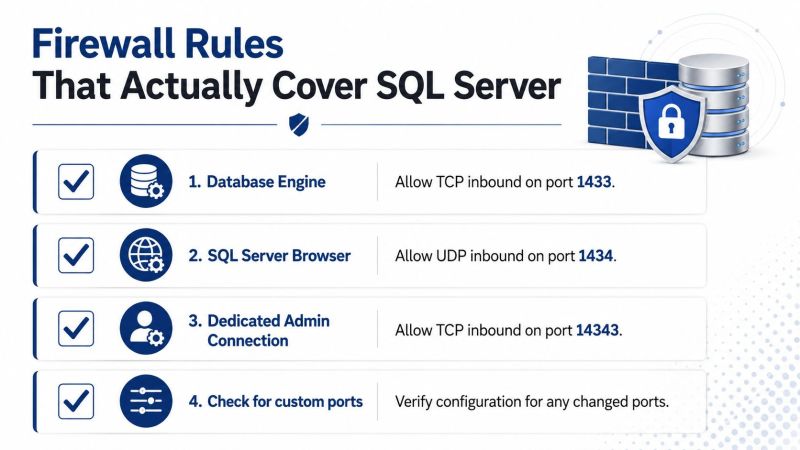
A usable SQL Server firewall rule set starts with the Database Engine, then adds discovery and replication paths only where they are needed. That sounds simple until the team has to support named instances, BI services, and high availability. The right answer is a service-map-driven rule set that opens only the endpoints the environment requires. Kagool's cloud infrastructure security best practices guide
Start with scope, not just ports
For application servers, open the narrowest path possible from the app subnet to the database subnet. For admin access, restrict the source to jump hosts or privileged management networks. For replica communication, keep the traffic limited to the participating nodes, because east-west SQL traffic should not look like general client access.
A firewall rule that matches the service role is easier to defend in review and easier to maintain after a change window. If a rule exists only because a port is familiar, it tends to survive long after the application topology changes.
The checklist network teams can work from
- Database Engine: Allow inbound TCP 1433 only where the default instance must be reachable.
- SQL Server Browser: Allow inbound UDP 1434 only when named-instance discovery is required.
- Custom or named-instance ports: Allow only the fixed port you have documented, or the dynamic range your design calls for.
- Always On and mirroring endpoints: Allow only replica-to-replica paths that the cluster or availability group uses.
If the environment uses named instances with dynamic ports, the team has three choices. They can allow Browser, pin the instance to a fixed port, or manage a dynamic range deliberately. Each option has trade-offs, but all three are better than pretending the instance is on 1433 when it is not.
Outbound rules matter too, especially for features that initiate connections to other SQL Servers or related services. Linked servers, replicas, and some administrative tools may require outbound allowances that are not obvious in a simplistic inbound-only review.
A practical rule set also needs clear ownership. DBAs can document the service endpoints, network engineers can enforce the subnet boundaries, and security auditors can verify that each open path maps to a stated business need. When those three views line up, the firewall stops being a guessing game and becomes part of the SQL Server control surface.
SQL Server Ports in Hybrid and Cloud Scenarios
Port knowledge carries over into hybrid and cloud designs, but the control plane changes. On Azure Virtual Machines running SQL Server, the same engine default still matters, while access control is often split between traditional firewalls and cloud-native controls. On managed services such as Azure SQL, the concept of a fixed engine port is still familiar, but the implementation and exposure model are different.
The safest habit is to treat 1433 as the familiar engine reference point, then verify how that service is published in the target environment. For site-to-site connectivity, the same rules about least privilege and documented endpoints still apply, but private connectivity, network security groups, and routing often become as important as the SQL configuration itself. Kagool's Databricks migration strategy guide
Hybrid teams need one language
Infrastructure teams often think in subnets and security groups. DBAs think in instance names and service endpoints. Security teams think in trust boundaries and audit evidence. Port configuration sits in the middle, so the documentation has to translate cleanly across all three viewpoints.
That's especially important when the platform includes Always On, because replica paths can live outside the main application flow. If the architecture diagram only shows the application front door, the team will miss the east-west traffic that keeps the cluster healthy. In practice, miscommunication happens most often, not in the engine itself.
The best hybrid deployments don't assume the cloud firewall behaves like an on-premises firewall. They map the service, the source, and the path explicitly, then validate the rules in both the cloud layer and the SQL layer.
Troubleshooting Connection Failures Related to Ports
When a client can't reach SQL Server, start by separating network failure from authentication failure. A timeout, a refused connection, or a named-instance lookup problem often points to port reachability, even when the error message sounds like a login problem. The SQL Server error log is still the first place to check because it tells you what the server believes it is listening on.
If the instance is named, Browser becomes a prime suspect. If Browser is blocked or disabled, clients that rely on discovery may fail even though the engine itself is healthy. If the connection string specifies the wrong port, the client can fail cleanly and still leave the team chasing the wrong issue.
For people who administer SQL from mixed platforms, the setup guidance in SQL Server setup for Mac users is a useful reminder that client tooling doesn't change the network rules. The same port behavior still applies, regardless of whether the management workstation is Windows or macOS.
A short decision path
- Can the server be reached at all? If not, check the firewall and routing path first.
- Does the error log show the expected port? If not, fix the listener configuration.
- Is this a named instance? If yes, verify Browser or the explicit port used by the client.
- Did the connection string change? If yes, confirm aliases and application settings.
That sequence is usually enough to narrow the failure without guesswork. It also keeps the team from wasting time on credential resets when the actual issue is a blocked port or a stale connection string.
If your environment uses VPN-based access, the same logic still holds. The tunnel changes the transport, not the SQL Server rules. Kagool's executive guide to enterprise network security
Quick Reference and Related SQL Server Networking Topics
The practical answer is not a single port number. TCP 1433 is the usual engine port for a default SQL Server instance, UDP 1434 supports SQL Server Browser, and named instances may listen on dynamic ports instead of a fixed one. SQL Server also exposes other service-specific ports, so the key question is always which service is listening and which clients are allowed to reach it.
| Topic | Operational takeaway |
|---|---|
| Default engine access | Confirm whether the Database Engine is bound to TCP 1433 or a custom port. |
| Named instance access | Expect a dynamic port unless the instance has been pinned to a fixed one. |
| Browser service | Use UDP 1434 only when clients depend on instance discovery. |
| Security control | Firewall rules and least-privilege source access matter more than renaming the port. |
For a broader networking primer that places SQL Server beside other common protocols, the TCP UDP common ports guide is a useful companion. It helps separate the service port from the application rule, which is where teams often lose time during reviews.
The operational checklist is simple. Verify the listening service, document the exact port in use, allow only the required sources, and keep unused access paths closed. A DBA usually needs the listener state and the firewall path. A network engineer usually needs the port map and source restrictions. A security auditor usually needs proof that the exposed ports match the documented services and that the rest are not reachable.
If you need a short reminder for reviews or runbooks, use this order: confirm the engine port, confirm whether Browser is required, confirm the client connection string, and confirm the firewall rule on both ends. That is the part that prevents avoidable outages.

